CutoutClip vs VideoBGNinja: free limits, price and a 3-clip test
VideoBGNinja removes the background from clips up to 90 seconds for free, up to 10 a day, with no account. CutoutClip is free up to 10 seconds and costs $4.99 for a longer video. For a person filmed against an ordinary background, in a clip under 90 seconds, VideoBGNinja's free tier is the cheaper choice. This page shows where the two differ, including the same three clips run through both.
Drop a video or GIF here
Free: up to 10 seconds · no signup · no watermark
MP4, MOV or animated GIF, up to 500 MB
One video up to 2 minutes · one-time payment, no subscription · no watermark
Pay $4.99 and remove the backgroundCheckout is handled by Waffo, our Merchant of Record. If processing fails, the payment is refunded automatically.
Uses one of your 3 free clips today.
Safari may show a black background in this preview; the downloaded WebM keeps the transparency.
More formats
Rendered from your result, usually in under 30 seconds. MP4 files keep the original audio.
Files are deleted automatically 24 hours after upload.
Recent clips
CutoutClip vs VideoBGNinja at a glance
| CutoutClip | VideoBGNinja | |
|---|---|---|
| Account | None, no signup | None, no signup |
| Free use | Clips up to 10 seconds, 3 per day, no watermark | Clips up to 90 seconds, up to 10 a day, no watermark |
| Free file size and resolution | Up to 500 MB, processed at up to 1080p | Up to 2 GB, processed at up to 1920 px on the long side |
| Paying | $4.99 per video up to 2 minutes, one-time, no subscription | Optional pass: €3 for 24 hours or €5 for 30 days, no subscription |
| Limits when you pay | 2 minutes (up to 3,600 frames), 500 MB, 1080p | 4 minutes, 4 GB, the clip's full resolution up to 4K |
| Subjects | Two modes chosen before upload: Person, or Object, pet or cartoon | “It works best on people. Pets and objects sometimes work, but expect softer edges” |
| Transparent output | WebM (VP9 with alpha), ProRes 4444 MOV (first 60 seconds), transparent GIF (first 15 seconds), animated transparent WebP. All available on free clips too | Transparent WebM and a transparent GIF (first 10 seconds, 480 px) for free; ProRes 4444 MOV with the pass |
| Other outputs | Alpha matte MP4, green screen MP4, clean-edges WebM, and the clip on a color, your own image or a blurred background as MP4 | Green-screen MP4 and an alpha matte |
| Input | MP4, MOV or animated GIF | “MP4, MOV, WebM & more” |
| File retention | Free files deleted after 24 hours, paid files after 7 days, or immediately with Delete now. Each clip has a private link | Upload deleted when processing finishes; results wiped within 45 minutes |
| How it is funded | The $4.99 per-video price. No ads | Ads and the optional pass; it runs on its own hardware |
| If processing fails | Automatic full refund | We did not find a refund policy for the pass on its home or pricing page |
VideoBGNinja details are from videobgninja.com as read on 2026-10-12; check its site for current limits and prices. Not affiliated.
The same three clips through both tools
On 2026-10-12 we uploaded three of our sample clips to both tools, once each, and compared the downloaded transparent WebM files frame by frame. Each clip is 7 seconds, 720×1280, 25 fps. Both tools returned files with the same size, frame rate and length as the source.
| Clip | Result | What we measured |
|---|---|---|
| Curly hair, plain wall | No meaningful difference | The cutout covers 45.2% of the picture in ours and 45.3% in theirs; no frame with a missing area in either |
| Full-body dance, indoor room | Close. VideoBGNinja's edge along one trouser leg was rougher in some frames | The cutout covers 22.8% of the picture in both |
| Hair in wind, outdoors | CutoutClip kept the whole subject. VideoBGNinja's result left out part of the red top | In 84 of 175 frames its cutout was missing an area ours kept, up to 6.0% of the picture |
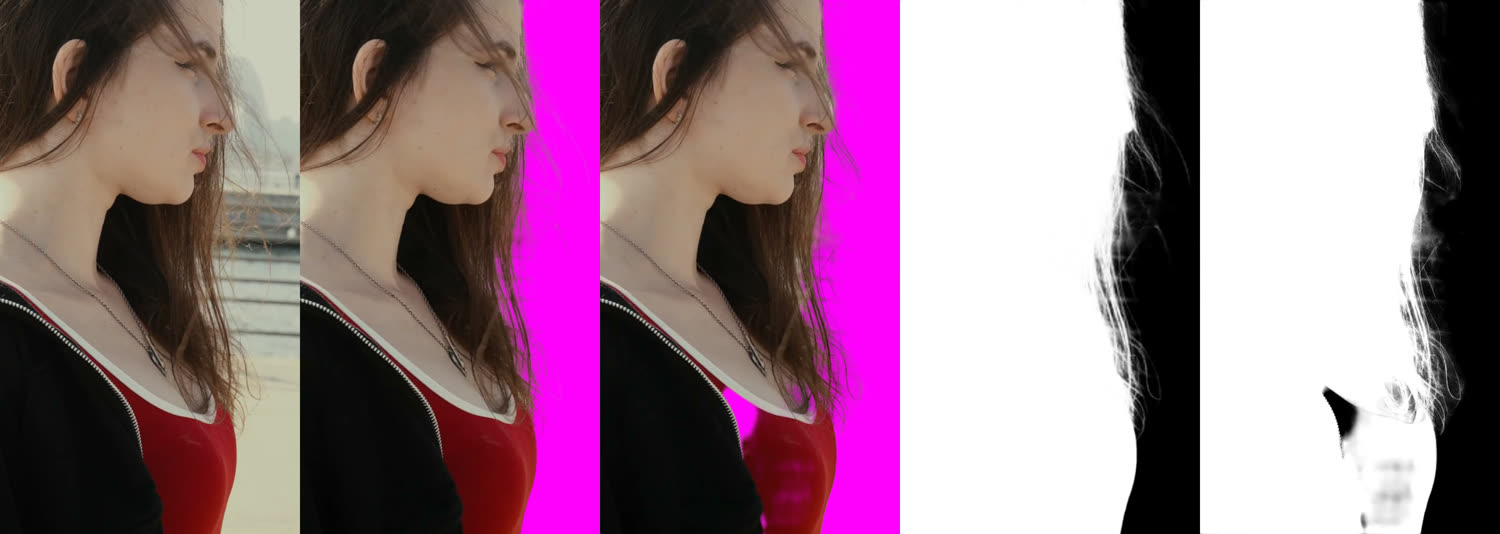
- Soft edges: VideoBGNinja's cutouts had slightly more semi-transparent edge area in all three clips (on the wind clip, 9.3% of the picture against 6.6%). On the wind clip that meant more loose strands of hair, and also faint grey patches beside it.
- Speed: VideoBGNinja was faster. On the two clips we timed it took 24 and 30 seconds from choosing the file to a finished result; CutoutClip took 39 to 63 seconds on the three clips.
This is a small test: three short clips of people, one run each. It does not show that either tool is better in general. Both are free for clips this short, so the fair check is your own footage: cut 10 seconds of it and run it through both.
When VideoBGNinja is the better choice
- Your clip shows a person, is between 11 and 90 seconds long, and you want to pay nothing.
- You have several longer clips, a 4K source, or a clip of 2 to 4 minutes. Its €3 day pass covers them; CutoutClip charges $4.99 per video, stops at 2 minutes and works at up to 1080p.
- You want the result quickly. It was faster in our test.
- Your source is a WebM or another format CutoutClip does not accept, or it is larger than 500 MB.
- You do not want the files kept: it states that results are wiped within 45 minutes.
When CutoutClip is the better choice
- The subject is not a person. Choose Object, pet or cartoon before you upload; see the tested results and failures for pets, products and cartoons.
- A free cutout has holes or patchy edges on your clip, as on the wind clip above. For a clip over 10 seconds you can run the first 5 seconds here for free and compare before paying.
- You need a ProRes 4444 MOV for an editor and do not want to buy a pass: it is included, free for clips up to 10 seconds and in the $4.99 for longer ones (first 60 seconds). See transparent video for Premiere Pro.
- You want a finished version rather than a cutout: the clip on a solid color, your own image or a blurred background as an MP4, a clean-edges WebM, or an animated transparent WebP. See change video background.
- You want to come back to the file. Results stay behind a private link for 24 hours, or 7 days after payment.
CutoutClip works best with one clear subject in focus. Several moving subjects, partly out-of-focus people, caption text and thin line art can fail; check the before and after samples first, including the one where it struggles. Safari cannot display WebM transparency, though the file is still transparent. CutoutClip does not accept video backgrounds, trimming or captions.
How to get a transparent video with CutoutClip
- Upload an MP4, MOV or animated GIF (up to 500 MB). No account needed.
- Wait while it processes: about a minute or less for a clip of up to 10 seconds, as in the test above.
- Download the transparent WebM at up to 1080p, with the original audio, and the original frame rate up to 30 fps.
- Optional: open More formats for ProRes 4444, an alpha matte, green screen, a color or image background, a blurred background, or a transparent GIF.
Specs
| Free tier | Clips up to 10 seconds, 3 clips per day, no signup, no watermark |
|---|---|
| Input | MP4, MOV or animated GIF, up to 500 MB. A GIF is converted to video first, then processed like any clip |
| Output | Transparent WebM (VP9 with alpha channel) at up to 1080p: clips larger than 1080p (for example 4K) are scaled down to 1080p before processing, smaller clips keep their resolution. With the original audio. Original frame rate up to 30 fps; free clips above 30 fps are processed at 30 fps |
| More formats | MOV ProRes 4444 with alpha for Premiere, DaVinci Resolve and Final Cut (first 60 seconds), alpha matte MP4, clean-edges WebM (steadier hair edges, less flicker), green screen MP4, white, black or any color background MP4, your own image as background, blurred background MP4, transparent GIF (first 15 seconds, hard edges), transparent WebP, animated (first 15 seconds, keeps soft edges) |
| Typical speed | About 20–30 seconds of processing for a 10-second 1080p clip |
| AI model | VEED video background removal (fast, edge refinement on), run on fal.ai |
| Best for | One clear subject. Two subject types, chosen before upload: Person (talking heads, presenters, dancers, hands and hair) and Object, pet or cartoon (the default for GIFs). Several moving subjects, caption text and thin line art can fail |
| Privacy | Free files are deleted 24 hours after upload; paid files 7 days after payment; or immediately with “Delete now”. No account: each clip has a private link |
| Longer clips | $4.99 per video up to 2 minutes (up to 3,600 frames), pay once, no subscription, free 5-second preview before paying, automatic refund if processing fails |
FAQ
Is CutoutClip affiliated with VideoBGNinja?
No. CutoutClip is an independent service and is not operated by VideoBGNinja.
Which is cheaper for a 60 or 90 second clip?
VideoBGNinja: it states a free tier for clips up to 90 seconds, up to 10 a day. CutoutClip is free up to 10 seconds and charges $4.99 once for a clip of 11 seconds to 2 minutes. See CutoutClip pricing.
Which one gives a cleaner cutout?
In our test on 2026-10-12, with three 7-second clips of people run once through each tool, two clips showed no meaningful difference and one, hair in wind outdoors, was cleaner at CutoutClip: VideoBGNinja left out part of the clothing in 84 of 175 frames. Three clips are too few to generalize, so test a short cut of your own footage in both.
Do both export ProRes 4444 with alpha?
VideoBGNinja adds a ProRes 4444 MOV with its paid pass (€3 for 24 hours or €5 for 30 days). CutoutClip includes a ProRes 4444 MOV of the first 60 seconds: free for clips up to 10 seconds, and in the $4.99 for longer clips.
Does VideoBGNinja work on pets or objects?
Its own FAQ says: “It works best on people. Pets and objects sometimes work, but expect softer edges”. CutoutClip has a separate mode for an object, pet or cartoon; see the GIF background remover page for what it kept and where it failed.
Which tool keeps my files longer?
CutoutClip keeps free results for 24 hours and paid results for 7 days behind a private link, or deletes them at once with Delete now. VideoBGNinja states that the upload is deleted when processing finishes and results are wiped within 45 minutes.